A Complete Guide to RFID Cashless Card Systems for School Canteens
August 18, 2024 in Blog
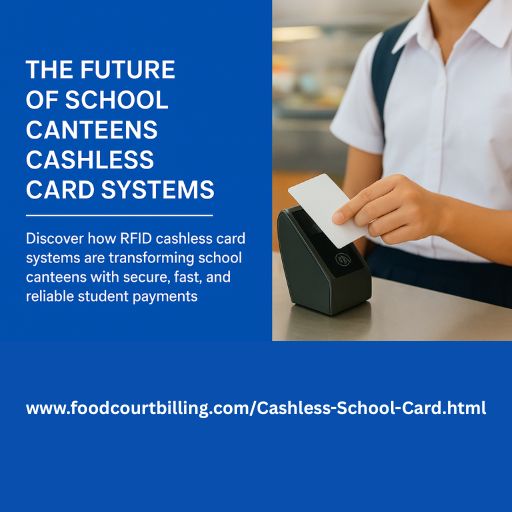
Learn why RFID prepaid cards with offline Windows software are the future of school canteens - safe, efficient, and student-friendly payments.
Schools today need fast, secure, and simple ways to handle lunch payments — and School Canteens Cashless Card Systems built on offline Windows RFID technology deliver exactly that. If you manage a school canteen, parent association, or campus facilities, this guide explains how RFID prepaid card systems (Windows-based, offline) work, why they’re the best fit for schools, and how to implement one with minimal fuss.
What is an offline Windows RFID School Canteen System?
An offline Windows RFID canteen system uses prepaid student RFID cards and Windows-based POS software running on local PCs. Students tap their card at the counter; the Windows POS reads the tag via a USB/serial RFID reader and deducts the purchase from the local database (MS SQL Express or SQLite). No internet required for daily operations—transactions and reports remain on-premises.
How it works — step by step
- Issue & encode cards on a Windows PC using a card encoder.
- Top-up balances at the school office (cash collected → staff enters top-up in the Windows admin console).
- Tap & pay — students tap cards at POS readers; balance updates instantly.
- Log & report — every transaction is recorded in the local DB for reconciliation.
- Manage lost cards — block and reissue cards quickly using the admin console.
Key components you’ll need
- RFID smart cards (prepaid student cards)
- RFID readers (USB/serial) at POS counters
- Card encoder/writer for issuing/replacing cards
- Windows POS software + admin console (offline-first)
- Local database (MS SQL Express or SQLite) and backup drive
- Receipt printer (optional) and basic POS hardware (Windows PC)
Why schools should choose offline Windows RFID systems
- Network independence: works when internet is down — crucial for reliable daily service.
- Student-friendly: no phones required; ideal for younger children.
- Data privacy & control: student records remain on-premise, not in the cloud.
- Predictable costs: one-time license & hardware vs recurring cloud subscriptions.
- Simple operation: cash top-ups and local reporting that school staff can manage easily.
Benefits for schools, parents and students
For schools: faster queues, lower cash-handling errors, simpler audit trails, and integrated canteen billing reports.
For parents: clear visibility on spending, option to set daily limits, and assurance that funds are used responsibly.
For students: no need to carry cash, quicker access to meals, and fewer lunchtime delays.
Security & privacy (offline focus)
Offline systems can be very secure: use encrypted local databases, role-based access in the Windows app, and routine encrypted backups to external drives. Implement PIN for added protection and keep retention policies minimal—store only what’s necessary for operations and auditing.
Implementation roadmap (simple)
- Assess needs — number of POS stations, expected daily transactions, and backup plans.
- Procure hardware & software — RFID cards/readers, card encoder, Windows PCs, local DB.
- Install & configure — set up POS, drivers (COM/USB), and scheduled backups.
- Pilot — test with one grade or section for 2–4 weeks.
- Train staff — cashiers, admin, and IT should know top-up, refund, and lost-card procedures.
- Roll out & maintain — scheduled checks, local updates, and periodic hardware replacement.
Costs & ROI
Initial costs cover RFID cards, readers, encoder, Windows POS license, and setup. Compared to recurring cloud fees, offline RFID solutions often pay back quickly via reduced cash handling, less theft, and improved staff efficiency. Track ROI by measuring queue times, cash discrepancies, and admin hours saved.
Common troubleshooting tips (Windows-specific)
- Reader not detected: check USB/COM port and install vendor driver.
- Card encoding fails: re-run encoder utility and verify card type.
- Database issues: restore from recent encrypted backup and run integrity checks.
- Printer errors: validate Windows printer driver and port settings.
FAQs
1.Are cashless card systems safe for children?
Yes—offline RFID systems support PINs, audit logs, and encrypted local storage.
2.How do parents recharge cards offline?
Parents deposit cash at the school office; staff credit the student account via the Windows admin console.
3.What if a card is lost? Block the card in the admin console and issue a new encoded card with the remaining balance transferred.
4.Do these systems need the internet?
No—daily transactions run offline; the internet is optional for software updates or remote backups.
Conclusion & next steps
Offline Windows RFID School Canteens Cashless Card Systems offer reliable, private, and cost-effective cashless payment management for schools. They reduce queues, protect student funds, and simplify accounting—without depending on mobile devices or cloud services.
If you manage a school canteen and want a dependable offline solution, consider a pilot deployment. For tailored Windows-based, RFID canteen software and hardware bundles, visit FoodCourtBilling.com to request a demo or download a deployment checklist.
You can reach us by phone at +91 9810078010 or by email at ats.fnb@gmail.com. Thank you for your interest in our services.
Cashless Card Payment System for School
Upgrade your establishment with our Prepaid Card Software and take your business to the next level.
You can reach us by phone at +91 9810078010 or by email at ats.fnb@gmail.com. If you want to more information just visit: https://www.foodcourtbilling.com