Multi-Vendor Food Court Billing System: How to Manage Tenant Settlements and Prevent Revenue Leakage
August 9, 2026 in Blog
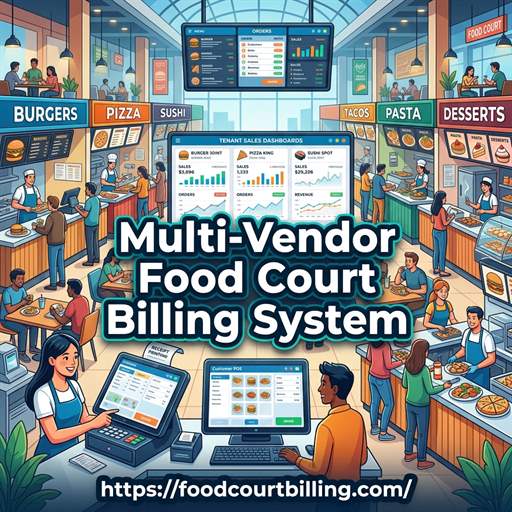
Shopping malls, commercial complexes, tech parks, and entertainment hubs feature bustling multi-vendor food courts. While offering diverse dining choices attracts high footfall, managing financial operations across dozens of independent food stall vendors can quickly become chaotic. Traditional decentralized cash registers lead to cash theft, unrecorded sales, manual calculation errors, and contentious tenant revenue share disputes. To overcome these hurdles, forward-thinking operators rely on a specialized food court billing system using closed-loop RFID smart cards.
1. Centralizing Cash Collection & Eliminating Cashier Theft
In a standard food court setup where each tenant operates their own cash drawer, food court management has zero visibility into real-time gross sales. Cashiers can easily bypass billing, give unauthorized discounts, or pocket cash payments. A centralized multi-vendor billing system eliminates cash handling at individual food stalls. Customers purchase or recharge a prepaid RFID smart card at central recharge desks or self-service kiosks. Food stall staff only interact with POS terminals to select menu items and tap the customer’s card. Shifting cash collection exclusively to central counters instantly secures 100% of revenue.
2. Automated Tenant Commission Splits & Financial Reconciliation
Food court lease contracts frequently involve revenue-sharing agreements where the property owner takes a percentage of daily gross sales alongside a base rental fee. Manually auditing paper receipts from dozens of vendors at the end of each day or month is slow and error-prone. A multi-vendor food court POS automatically calculates tenant commissions in real time. The software generates daily settlement reports detailing total items sold, gross revenue per vendor, management commission deductions, and net payout amounts. This transparency builds trust between landlords and food court tenants.
3. Instant KOT Transmission & Counter Velocity
Long lines during peak lunch and dinner hours cause customer frustration and lost sales. A professional multi-vendor billing system speeds up service by automating Kitchen Order Ticket (KOT) routing. When a customer orders at a central ordering kiosk or food stall counter, the system immediately prints a thermal KOT directly at the corresponding tenant kitchen or displays it on a Kitchen Display System (KDS). This eliminates verbal ordering errors, ensures food preparation starts immediately, and reduces total order-to-table turnaround time.
4. Offline-First Server Architecture for Zero Internet Downtime
Cloud-based billing applications that rely on internet connections pose significant risks for high-volume food courts. If the internet connection drops during peak weekend rushes, cloud POS terminals stall, bringing food service to a complete halt. A dedicated multi-vendor food court system utilizes an offline-first local network server. All card balance reads, transaction authorizations, and KOT printings execute locally in under a second with 100% uptime, automatically syncing financial data to the cloud in the background when connectivity resumes.
5. Actionable Sales Analytics & Tenant Menu Optimization
Data-driven decision-making is essential for maximizing food court profitability. Centralized billing software yields deep analytics into customer spending patterns, peak dining hours, top-selling dishes, and underperforming vendors. Property managers can use these reporting insights to curate a optimal tenant mix, adjust menu pricing, run promotional happy hours, and help stall owners optimize raw material purchasing to cut food waste.
Deploy a Multi-Vendor Food Court System
Advance Technology Systems (ATS) provides complete offline-first food court prepaid card systems, multi-tenant POS software, and automated revenue-sharing portals.
Conclusion
Implementing a multi-vendor food court billing system is the most effective strategy for eliminating cashier theft, streamlining tenant settlements, and boosting overall food court revenue. By centralizing cash collections into a closed-loop RFID environment, property managers ensure total operational control, speed up checkouts, and deliver a seamless dining experience.
FAQs: Multi-Vendor Food Court Billing System
- Q1: What is a multi-vendor food court billing system?
- A: A multi-vendor food court billing system is a specialized POS and cashless prepaid software solution that allows food court operators to centralize customer payments across multiple independent food counters, automatically tracking sales, tenant commissions, and revenue payouts.
- Q2: How does a multi-vendor POS prevent cashier revenue leakage?
- A: By shifting customer payments to central recharge counters or self-service kiosks, individual food stall cashiers never touch cash. Every order is verified digitally before food preparation, eliminating unrecorded sales and cashier theft.
- Q3: Can the software calculate dynamic tenant commission splits automatically?
- A: Yes. The backend software allows food court management to set fixed monthly rentals or percentage-based commission splits per tenant. Daily sales settlements and payout reports are calculated automatically.
- Q4: Does the food court billing system support offline transactions?
- A: Yes. Built on an offline-first local network server, POS registers and RFID card readers process checkouts in less than a second even during complete internet or cloud outages.
- Q5: What payment methods can customers use to top up food court smart cards?
- A: Customers can load funds onto prepaid RFID smart cards using physical cash, credit/debit cards, UPI apps, or online payment gateways.
- Q6: How do food stall vendors receive KOT (Kitchen Order Tickets)?
- A: When a customer taps their prepaid card or pays at a central POS counter, the system transmits order details directly to thermal KOT printers or Kitchen Display Systems (KDS) at the respective tenant stall.
- Q7: How are unspent customer balances managed at the end of the visit?
- A: Customers can refund unspent card balances instantly at cash desks before leaving, or retain the balance on reusable smart cards for future visits.
- Q8: What hardware is required for setting up a cashless food court?
- A: The setup requires Windows POS touch terminals, desktop RFID card reader/writers, thermal receipt printers, local server hardware, and reusable RFID smart cards or wristbands.
Multi-Vendor Food Court Billing System
Upgrade your food court operations with our prepaid card software and experience seamless tenant settlements.