Cloud vs Offline School Canteen Management Software: Which Is Better?
July 9, 2026 in Blog
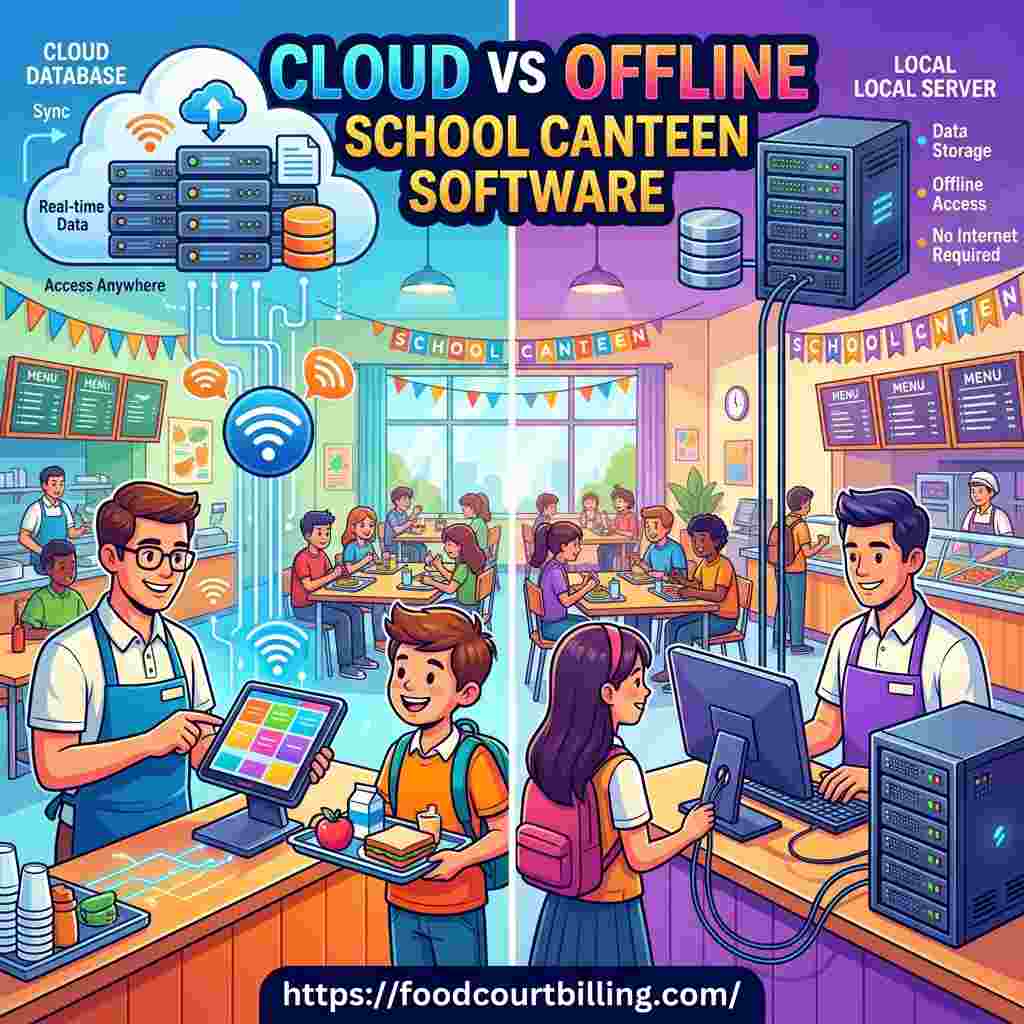
As school administrators and catering contractors look to modernize cafeteria operations, choosing a software system's database architecture is a key decision. Cashless canteen systems typically fall into two categories: cloud-based POS platforms and offline local server systems. While cloud software is popular in retail, school canteens have unique operational challenges. Recess lunch rushes are highly compressed, meaning speed and reliability are essential. Understanding the differences between cloud and offline architectures is crucial for selecting the best system for your campus.
For school boards, catering managers, and IT departments evaluating cafeteria software, understanding these database dynamics is essential. To explore our high-speed, offline-first school card systems, visit our dedicated Cashless School Card solutions page.
1. Speed & Latency During Peak Recess Rushes
School canteens operate under strict time limits. During a 15-minute recess break, hundreds of students crowd food counters simultaneously. In a cloud-based POS system, every transaction must travel to remote web servers, wait for authorization, and return to the terminal. Under optimal network conditions, this takes 2 to 3 seconds. However, if the school's bandwidth is congested by students and staff, this latency can increase significantly. An offline-first local network server processes card taps and database updates within the school building. Transactions take less than a second, allowing cashiers to serve students quickly and keep lines moving.
2. Zero Downtime: Protecting Canteen Operations
The biggest risk of cloud-only billing software is its total reliance on active internet connections. A single fiber cut or ISP outage will halt food sales entirely. In a school environment, leaving students without access to lunch during their break creates major operational disruptions. An offline-first canteen system runs on a local server database inside the school. The cash registers communicate directly with the local server, allowing billing to continue smoothly during complete internet outages. Once the connection is restored, the local server automatically syncs data back to the cloud database.
3. Parent Recharge Portals and Cloud Syncing
While registers must run offline for speed and reliability, parent portals require cloud connectivity. Parents need to log in remotely to view purchase histories and top up smart cards. A hybrid system provides the best of both worlds. The parent portal is hosted in the cloud, allowing parents to recharge cards online. These balances are automatically pushed to the school's local database. Register checkouts occur locally, ensuring fast transaction speeds, and are synced back to the parent portal in the background.
4. Security, Photo Audits, and Fraud Prevention
Canteen systems must prevent card trading, card misuse, and employee theft. Both cloud and offline systems offer good security. However, offline-first systems are highly secure for daily food court checkouts. Because student profiles and photos are stored on the local server database, cashiers can perform instant visual verification upon card tap, even without internet access. Digital closed-loop cards also eliminate cash transactions at registers, securing your canteen's revenue from leakage.
5. Long-Term Licensing and Operating Costs
Software cost structures differ significantly between cloud and offline architectures. Cloud software is typically sold as a monthly subscription (SaaS). Over time, these recurring fees can add up. Offline-first local server software often features a one-time license fee, providing a higher return on investment. While there is an initial hardware cost to set up the local server, the system's speed, reliability, and lower long-term costs make it a highly cost-effective choice for schools.
Deploy a Reliable Cashless Canteen
Advance Technology Systems (ATS) provides hybrid offline-first school card systems with robust local server reliability and cloud parent portals.
Conclusion
For high-volume school canteens, offline-first local server architecture is superior to cloud POS platforms. It delivers the transaction speed, zero internet downtime reliability, and security needed to manage recess rushes, protect cafeteria revenue, and ensure a smooth dining experience for students and staff.
FAQs: Cloud vs. Offline Cafeteria Systems
- Q1: What is the main difference between cloud and offline school canteen software?
- A: Cloud software processes all transaction data on remote internet servers, requiring active internet. Offline software runs on a local server network inside the school building, allowing transactions to process securely in under a second without relying on internet access.
- Q2: Why is offline-first software better for school lunch rushes?
- A: School lunch breaks are very short (15-20 minutes). A cloud-based POS often experiences network latency or connection drops, backing up lines. An offline-first local network server processes card taps instantly with 100% uptime, maximizing sales volume.
- Q3: How does offline canteen software sync data with the cloud?
- A: The local server processes transactions immediately and automatically syncs data to the cloud in the background when an internet connection is available. This ensures parent portal balances and audits remain updated.
- Q4: Can parents still recharge cards online if the school system is offline?
- A: Yes. Parents use a cloud-hosted parent portal to top up cards. These web recharges are pushed to the school's local server database automatically, updating the student's card balance.
- Q5: Is cloud or offline software more secure for student data?
- A: Both offer strong security when properly designed. However, offline-first systems hold primary transaction logs on site, reducing exposure to external internet data breaches during daily operations.
- Q6: Which system is easier to maintain for school IT departments?
- A: Cloud software requires zero on-site server hardware maintenance. However, an offline-first system is highly reliable because it isolates canteen registers from external network failures, reducing emergency support calls during recess.
- Q7: Does offline software support photo-verification at checkout?
- A: Yes. Student photos are stored on the local server database, allowing cashiers to perform instant visual verification upon card tap to prevent card sharing without internet reliance.
- Q8: How does server architecture affect software licensing costs?
- A: Cloud software is typically sold as a monthly subscription (SaaS), which increases long-term operational costs. Offline-first local server software often features a one-time license fee, providing a higher return on investment.
Cashless Card Payment System for Food Court and Canteen
Upgrade your establishment with our Prepaid Card Software and take your business to the next level.